What is RPCU? Link to heading
RPCU is an open source infrastructure platform built on OpenStack. The goal is straightforward: provide a multi-tenant cloud that an organization can deploy, operate, and fully understand - without vendor lock-in, without hidden abstractions, and with everything described as code.
RPCU is a lab and R&D project running on three baremetal servers from Hetzner. It’s not production-hardened for thousands of users, and it’s not trying to compete with managed cloud offerings. It’s a place to learn, experiment, and build something that works end to end.
The Problem Link to heading
OpenStack is powerful but complex. Kubernetes is flexible but has its own operational weight. NixOS is reproducible but has a steep learning curve. Getting them to work together - cleanly, declaratively, and without click-ops - is a real engineering challenge.
RPCU is an attempt to solve that integration problem. Not by building another abstraction layer, but by choosing the right tools and wiring them together with Infrastructure as Code.
The Three Pillars Link to heading
RPCU is organized into three repositories:
Aletheia — The Documentation Link to heading
VitePress documentation site. Architecture, install guides, operational procedures. In an IaC project, docs are part of the product since if it’s not documented, it’s not reproducible.
Argus — The GitOps Engine Link to heading
Flux CD repository that manages the entire stack. Clusters, CNI, storage, OpenStack control plane are all reconciled from Git. A change is a Git commit. No click-ops.
Hephaestus — The Operating System Link to heading
NixOS modules deployed via Colmena. Every machine is identical, reproducible, and version-locked.
Architecture Overview Link to heading
RPCU runs a multi-cluster architecture. The key thing to understand: the OpenStack cluster is the foundation. It runs on baremetal hardware and provides the VM infrastructure that the management cluster runs on.
┌─────────────────────────────────────────────────────────────────┐
│                  OpenStack Cluster (baremetal)                  │
│  lucy                  makise                  quinn            │
│  ┌───────────────────────────────────────────────────────────┐  │
│  │                 Yaook OpenStack Operators                 │  │
│  │  ┌────────┐ ┌────────┐ ┌──────────┐ ┌───────────────┐     │  │
│  │  │ Nova   │ │Neutron │ │ Keystone │ │   Glance      │     │  │
│  │  │(compute│ │(OVN)   │ │(identity)│ │  (images)     │     │  │
│  │  └────────┘ └────────┘ └──────────┘ └───────────────┘     │  │
│  └───────────────────────────────────────────────────────────┘  │
│  ┌────────┐ ┌─────────┐ ┌────────┐ ┌────────┐ ┌────────────┐    │
│  │Cilium  │ │ Rook/   │ │cert-   │ │kgateway│ │Crossplane  │    │
│  │(CNI)   │ │ Ceph    │ │manager │ │(GW API)│ │+ Zitadel   │    │
│  └────────┘ └─────────┘ └────────┘ └────────┘ └────────────┘    │
│                                │                                │
│              CAPO provisions VMs for mgmt cluster               │
└────────────────────────────────┼────────────────────────────────┘
                                 │
                                 ▼
┌─────────────────────────────────────────────────────────────────┐
│               Management Cluster (OpenStack VMs)                │
│  ┌────────────┐  ┌───────────┐  ┌───────────┐  ┌───────────┐    │
│  │ Cluster API│  │  Sveltos  │  │Crossplane │  │  Cilium   │    │
│  │ (CAPI/CAPO)│  │           │  │(chihiro)  │  │(no L2 LB) │    │
│  └─────┬──────┘  └─────┬─────┘  └───────────┘  └───────────┘    │
│        │              │                                         │
└────────┼──────────────┼─────────────────────────────────────────┘
         │              │
         ▼              ▼
┌─────────────────────────────────────────────────────────────────┐
│                    Workload Clusters (CAPI)                     │
│  CAPI-provisioned OpenStack VMs, managed via Sveltos            │
│  Opt-in add-ons: Cilium, Flux, OIDC RBAC                        │
└─────────────────────────────────────────────────────────────────┘
OpenStack Cluster: The foundation. Runs on three baremetal NixOS nodes (lucy, makise, quinn) with kubeadm and kube-vip HA. The full OpenStack control plane (Keystone, Nova, Neutron/OVN, Glance, Cinder, Octavia, Designate, Barbican, Horizon) runs as Kubernetes operators via Yaook. Rook/Ceph provides distributed storage. This cluster also manages the shared Zitadel identity platform via Crossplane.
Management Cluster: Runs as CAPO-provisioned OpenStack VMs. Bootstrapped with kind + clusterctl, intended to self-manage after clusterctl move. Runs Cluster API providers (to provision workload clusters), Sveltos (for multi-cluster add-on management), and a small Crossplane install (only the chihiro OIDC client). Uses OpenStack CCM + Octavia for LoadBalancer Services and Cinder CSI for storage, not Cilium L2 / Rook like the OpenStack cluster.
Workload Clusters: CAPI-provisioned OpenStack VMs. Managed declaratively by Sveltos from the management cluster via opt-in ClusterProfile resources gated by labels. Add-ons (Cilium, Flux, OIDC RBAC) are pushed per-cluster, not forced onto every cluster.
Technology Choices Link to heading
NixOS Link to heading
Every node (baremetal and VM) runs the same NixOS configuration. Packages, services, kernel modules, network interfaces are all Nix expressions and all reproducible. Colmena deploys across all nodes and produces VM images for Openstack/CAPO to consume.
Kubernetes Link to heading
Everything above the OS runs on Kubernetes. The OpenStack control plane, CAPI controllers, Sveltos, Crossplane are all Kubernetes workloads.
The baremetal OpenStack cluster runs kubeadm with kube-vip for API HA. The management cluster runs as CAPO-provisioned VMs, bootstrapped with kind then pivoted to self-manage. Workload clusters are provisioned declaratively by Cluster API.
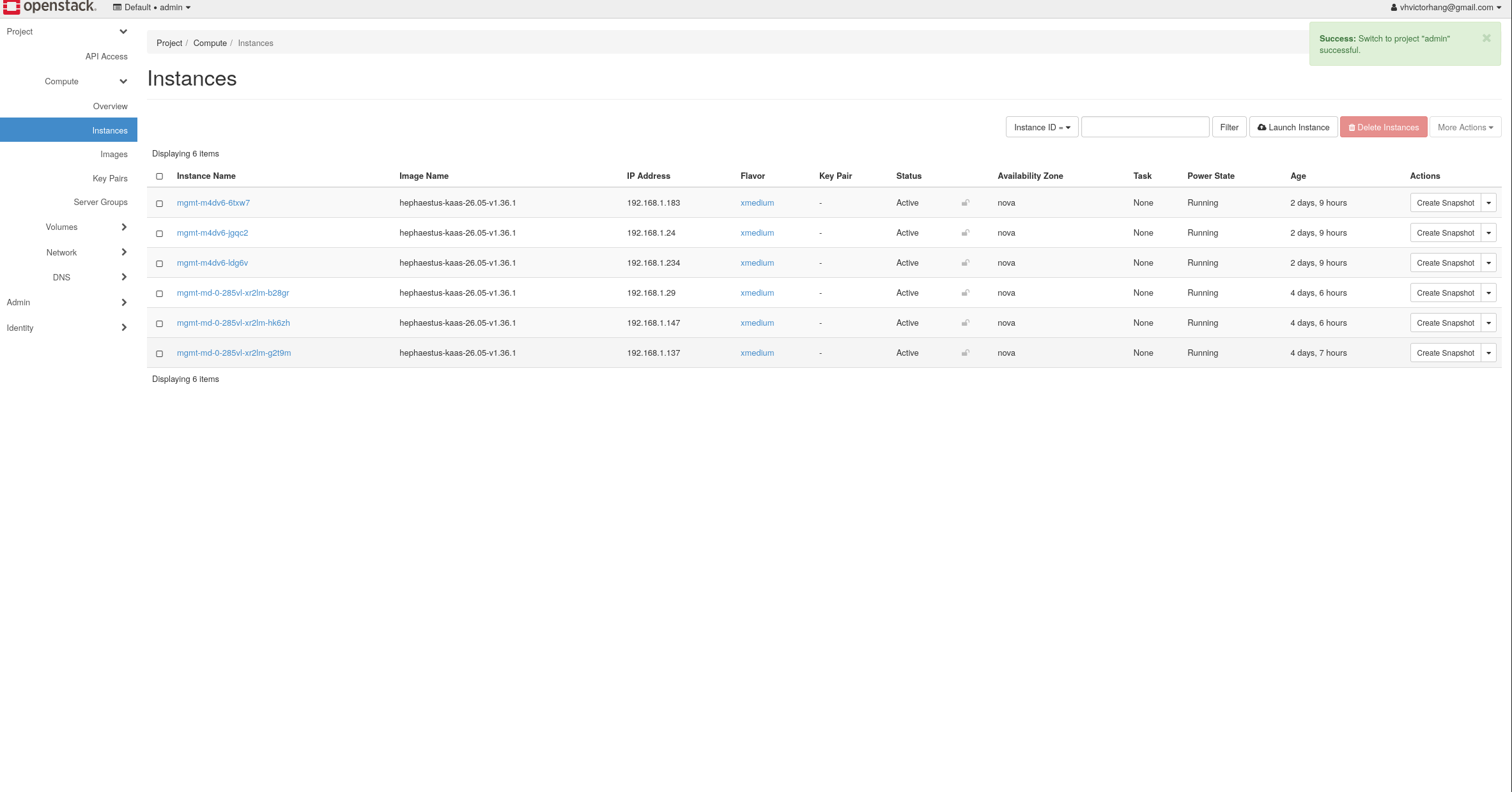
Kamaji offers an alternative for workload control planes: instead of 3 dedicated VMs per cluster, the API server, controller manager, and scheduler run as pods in the management cluster. A few pods instead of three VMs. Workers are still OpenStack VMs via CAPO.
openstack-default is available.OpenStack Link to heading
Compute (Nova), networking (Neutron/OVN), storage (Cinder), images (Glance), identity (Keystone), load balancing (Octavia), DNS (Designate) are all running as Kubernetes operators via Yaook and reconciled by Flux. No click-ops.
Adding compute is easy: join a node, apply labels, and Yaook operators wire it into Nova and OVN automatically. Rook/Ceph provides distributed storage. Cilium provides the CNI, replacing kube-proxy entirely.
Cluster API Link to heading
CAPO (Cluster API Provider for OpenStack) declaratively provisions workload clusters. Control planes, worker pools, networking are all Kubernetes CRs.
The ClusterClass pattern means a new cluster is a small Cluster CR with injected variables, this means no template forking needed. Sveltos-driven add-ons are gated by labels on the Cluster resource.
Flux Link to heading
Flux watches Argus and reconciles live state to match Git. Each cluster has its own sync path. On the OpenStack cluster, Flux manages everything: Cilium, Rook/Ceph, cert-manager, kgateway, Crossplane, and the Yaook operators that run OpenStack itself.
Workload clusters get Flux installed via Sveltos (the Flux Operator + a FluxInstance pointing at Argus). Once installed, Flux self-reconciles itself and reconcile any other deployment set in Argus.
The core principle: a change is a Git commit.
Sveltos Link to heading
Sveltos runs on the management cluster and pushes add-ons to CAPI-provisioned workload clusters. Rather than forcing every add-on onto every cluster, opt-in ClusterProfile resources with label selectors control what each cluster receives.
Each add-on has its own ClusterProfile: Cilium bootstrap (with per-cluster values injected via Go templates from the CAPI Cluster resource), Flux Operator + FluxInstance, and OIDC RBAC. This means a shared Git path can never force an add-on onto a cluster that didn’t opt in.
Chihiro Link to heading
Chihiro is a lightweight web UI for creating and managing workload clusters. Pick a Kubernetes version, set your worker groups and flavors, and Chihiro renders the Cluster CR and applies it to the management cluster.
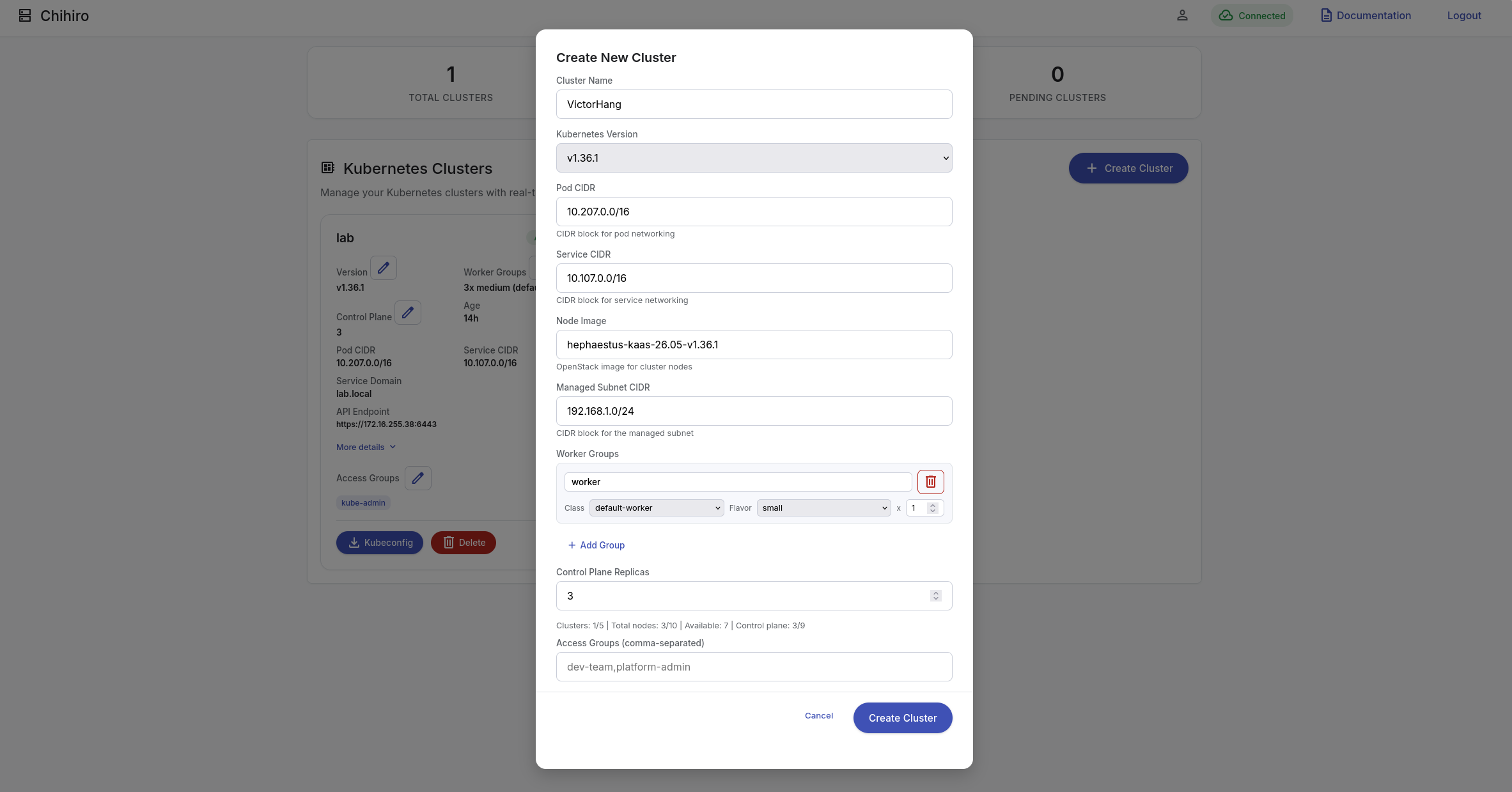
Chihiro is configured entirely through a ConfigMap: form fields are defined as injections (paths into the Cluster spec) and parameters (Go template variables). Adding a new field is a YAML edit so no code changes, no rebuild. It authenticates via OIDC against the shared Zitadel instance and lives on the management cluster.
Design Principles Link to heading
Everything is Infrastructure as Code Link to heading
There is no manual step. Every component from the operating system to the OpenStack control plane to tenant networking is described in code and reconciled automatically. A Git commit is the only interface.
Progressive Complexity Link to heading
You don’t need to understand the entire stack to get started. The NixOS layer is self-contained. Every node runs the same reproducible OS. The baremetal Kubernetes layer can run independently. The OpenStack control plane builds on top of Kubernetes. The management and workload clusters sit on top of OpenStack as VMs. Each layer has a clear boundary.
The Hardware Link to heading
RPCU runs on three Hetzner dedicated servers (Server Auction). Each machine has two NICs: one for public/management connectivity and a second internal NIC that connects all three nodes together on a dedicated Gbit LAN.
| Node | CPU | RAM | Storage | NIC |
|---|---|---|---|---|
| lucy | Intel Core i7-8700 (6c/12t) | 64 GB DDR4 (4× 16 GB) | 2× 1 TB NVMe SSD | 2× 1 Gbit (1 public, 1 internal) |
| makise | Intel Core i7-7700 (4c/8t) | 64 GB DDR4 (4× 16 GB) | 2× 1 TB NVMe SSD | 2× 1 Gbit (1 public, 1 internal) |
| quinn | Intel Core i7-8700 (6c/12t) | 128 GB DDR4 (4× 32 GB) | 2× 1 TB NVMe SSD | 2× 1 Gbit (1 public, 1 internal) |
| Total | 16 cores / 32 threads | 256 GB DDR4 | 6 TB NVMe | 6× 1 Gbit |
Modest consumer-grade hardware with no enterprise NICs, no redundant networking, no dedicated load balancers. That constraint is the point: everything above runs the full OpenStack control plane, Rook/Ceph storage, and nested CAPI clusters on top of it.
What’s Next Link to heading
This post is an overview. In follow-up posts I’ll detail the bootstrapping process more thoroughly, and over time I’ll dig into some of the other technical details behind RPCU, the networking quirks, the OpenStack-on-Kubernetes wiring, and the GitOps workflow.
If you’re interested in the architecture or want to try building something similar, the documentation and code are on GitHub. For the complete documentation of architecture deep-dives, bootstrap guides, and operational procedures, please visit the RPCU Documentation.
The Team Link to heading
RPCU is built by: